
Open MSG Files Online
No Outlook required. Free and private.
Can't open an MSG file? Our free Chrome extension lets you open any .msg file instantly in your browser — without Microsoft Outlook, without uploading your files, and without any cost.
How to Open MSG Files — Step by Step
Open any .msg file in under a minute. No technical knowledge required.
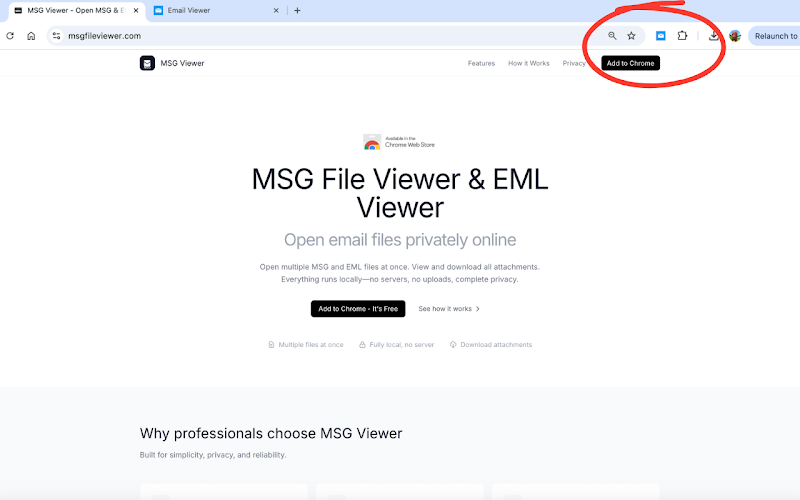
Install MSG Viewer
Add the free MSG Viewer extension from the Chrome Web Store. One click to install — no account, no registration, no cost.
Select Your MSG Files
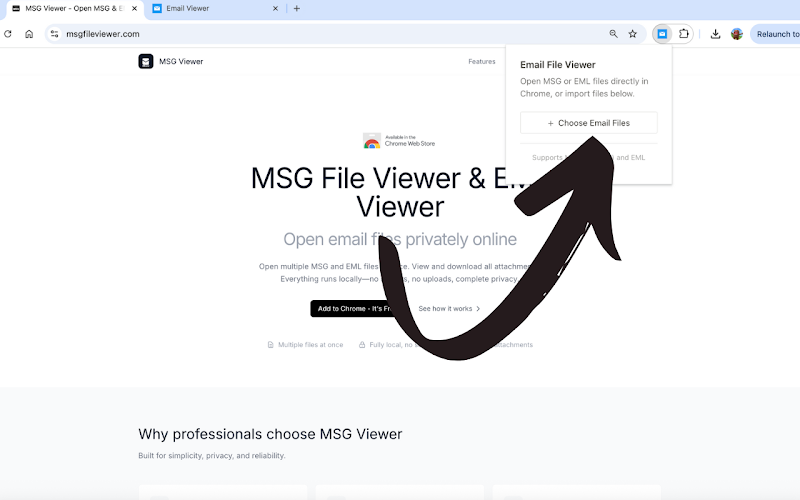
Click the MSG Viewer icon in your toolbar, then "Import Files" to choose your .msg files. You can select one file or multiple files at once.
View Your Email
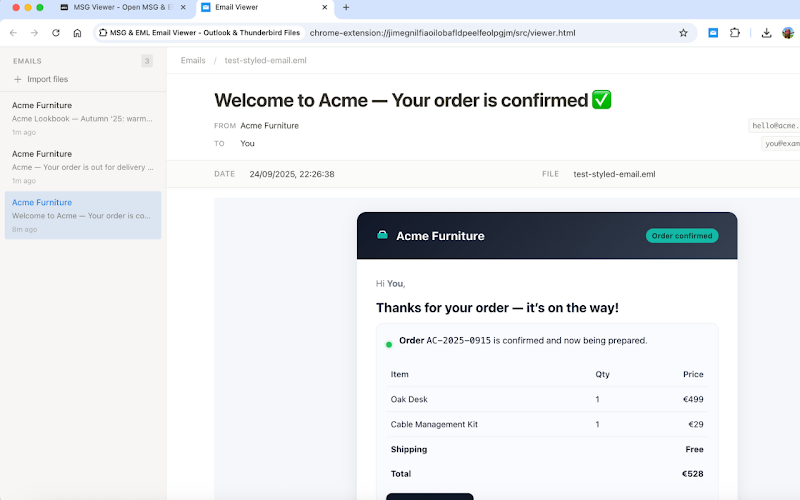
Your MSG file opens instantly with the complete email: formatted body, all headers, embedded images, and downloadable attachments.
You can see
- Full email body
- From, To, CC, BCC
- Embedded images
You can do
- Download attachments
- Browse multiple emails
- View all metadata
Why Can't I Open MSG Files?
MSG files are locked to Microsoft's ecosystem. Here's why — and how to solve it.
MSG files (.msg) are Microsoft Outlook's proprietary email format. They use a binary structure called Compound File Binary Format (CFBF) — the same format used by older .doc and .xls files. This means they can only be opened natively by Microsoft Outlook.
If you receive an MSG file but don't have Outlook installed — whether you're on a Mac, Linux, Chromebook, or simply don't have an Office license — the file appears as an unknown format that your system can't open.
MSG Viewer solves this problem by parsing the MSG binary format directly in your browser using JavaScript. No server processing, no file conversion, no Outlook needed. Your MSG file opens exactly as the sender saw it.
Without MSG Viewer
Need Outlook ($99+/year), can't open on Mac/Linux, no way to view without software
Other Online Viewers
Upload your private emails to unknown servers, slow processing, file size limits
MSG Viewer
Free, instant, 100% local processing. Works on any OS. No file leaves your computer.
When You Need to Open MSG Files
Real situations where MSG Viewer saves the day
Received an MSG attachment
Someone forwarded you an email as an .msg file but you don't use Outlook? Open it instantly in Chrome. See the full email with all attachments, exactly as sent.
Legal email discovery
Reviewing email evidence for legal proceedings? Open MSG files privately without uploading to any third-party service. All metadata and headers preserved.
Switching from Outlook
Migrating away from Outlook but still have MSG archives? Batch open your saved emails to review and extract important attachments or information.
Using a Mac or Chromebook
MSG is a Windows/Outlook format, but you're on a Mac, Linux machine, or Chromebook? MSG Viewer works on any platform with Chrome.
IT troubleshooting
Need to inspect email headers, routing info, or MIME structure of an MSG file? Open it quickly without setting up a full Outlook profile.
Cloud storage files
MSG files stored in Notion, Google Drive, or Dropbox? Click to open them directly without downloading first. Works seamlessly with cloud services.
FAQ: Opening MSG Files
Everything you need to know about opening MSG files
How do I open an MSG file without Outlook?
What is an MSG file?
Can I open MSG files on a Mac?
Are my files safe? Do they get uploaded?
Can I download attachments from MSG files?
Can I also open EML files?
Does it work offline?
Open Your MSG Files Now
Free forever. No Outlook needed. No files uploaded. Works on any OS.
Add to Chrome - It's FreeAlso opens EML files · View MSG files online