
EML Viewer for Chrome
Open EML files directly in your browser
View EML email files instantly without installing any software. Our free Chrome extension opens EML files locally in your browser — no uploads, no servers, complete privacy.
What is an EML File?
An EML file (.eml) is a standard email message format defined by RFC 5322. Unlike Microsoft's proprietary MSG format, EML is an open standard used by a wide range of email clients including Mozilla Thunderbird, Windows Mail, Apple Mail, and many others.
What EML files contain
- Email headers (From, To, Subject, Date)
- Plain text and HTML email body
- File attachments (Base64 encoded)
- Embedded images and inline content
- MIME type information
Email clients that use EML
- Mozilla Thunderbird
- Windows Mail / Windows Live Mail
- Apple Mail
- Outlook Express
- Many other RFC 5322 compliant clients
While EML is widely supported, you may receive EML files when you don't have an email client installed — for example, as email exports, legal documents, or archived communications. That's where our EML viewer for Chrome comes in: open any EML file instantly, right in your browser.
How to Open EML Files in Chrome
View any EML file in 3 simple steps — no email client required
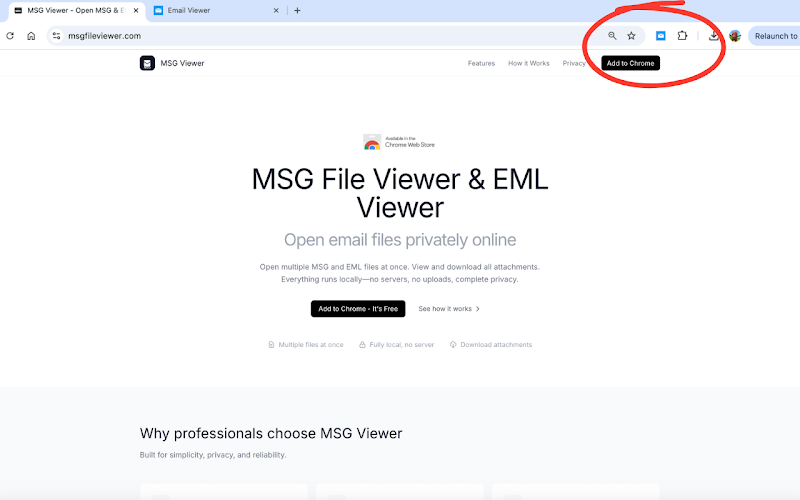
Install the Extension
Add MSG Viewer to Chrome from the Chrome Web Store. Takes just a few seconds with minimal permissions.
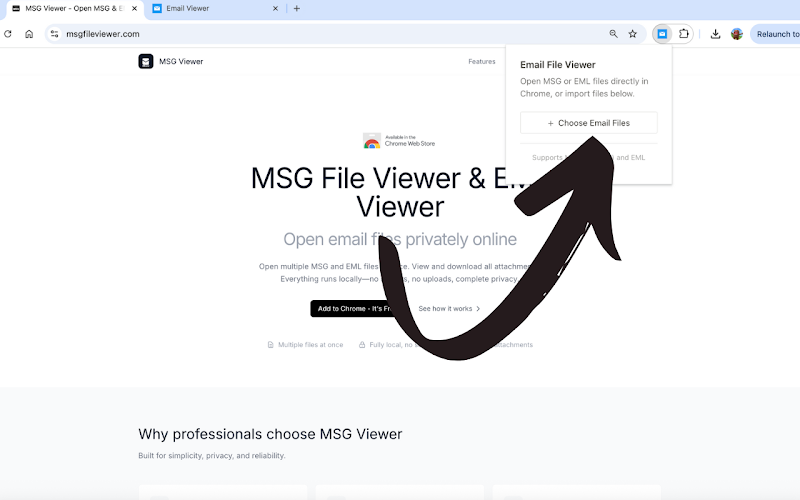
Import Your EML Files
Click the extension icon and select your EML files. You can open one file or import multiple EML files at once for batch viewing.
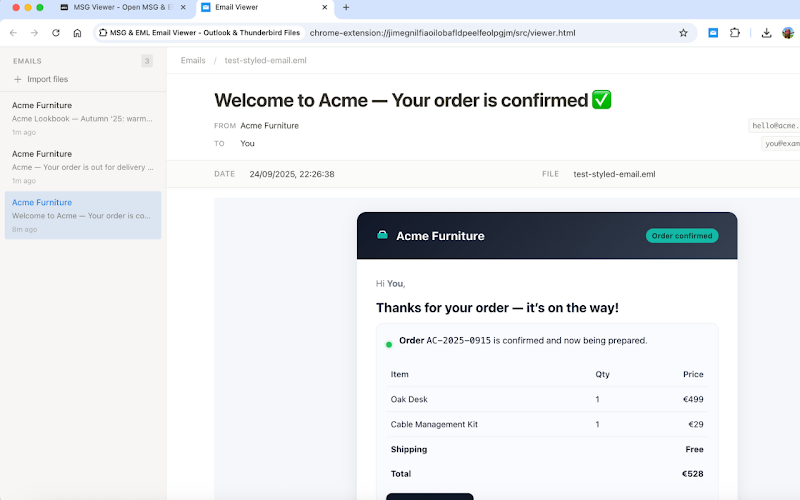
View & Download
Your email renders instantly with full HTML formatting. View headers, download attachments individually, and browse through your emails.
Why Use Our EML Viewer?
The fastest and most private way to view EML files online
Complete Privacy
Your EML files never leave your computer. All processing happens locally in Chrome — no server, no cloud, no tracking. Your emails stay yours.
Instant Rendering
EML files open immediately. Full HTML formatting, embedded images, and styled content render exactly as the sender intended.
Attachment Support
View all attachments included in EML files and download them individually with their original filenames. Supports all attachment types.
Batch Processing
Open multiple EML files at once. Perfect for reviewing email exports, legal discovery documents, or archived email collections.
Works Offline
No internet connection needed. Once installed, the EML viewer works entirely offline — ideal for air-gapped environments or travel.
Cross-Platform
Works on Windows, Mac, Linux, and Chrome OS. Anywhere Chrome runs, your EML viewer is ready.
EML vs MSG: What's the Difference?
Both are email file formats, but they come from different ecosystems
| Feature | EML Files | MSG Files |
|---|---|---|
| Format | Open standard (RFC 5322) | Microsoft proprietary (CFBF) |
| Used by | Thunderbird, Apple Mail, many others | Microsoft Outlook |
| Readability | Plain text (human-readable) | Binary format |
| Attachments | Base64 encoded inline | Embedded in binary structure |
| Compatibility | Wide cross-platform support | Requires Outlook or special viewer |
MSG Viewer handles both formats. Whether you have EML or MSG files, you can open them in seconds.
Who Uses Our EML Viewer?
Trusted by professionals who need a reliable way to view email files
Legal Professionals
Review email evidence and discovery documents. EML files from Thunderbird and other clients open instantly with preserved metadata.
IT Administrators
Troubleshoot email issues by inspecting EML headers, routing information, and MIME structures without a full email client.
Chromebook Users
No desktop email client on Chrome OS? No problem. View any EML file directly in your Chromebook's browser.
EML Viewer FAQ
Common questions about opening EML files in Chrome
What is an EML file?
How do I open EML files in Google Chrome?
Is it safe to open EML files with this extension?
Can I view EML files on a Chromebook?
Can I open EML files from cloud storage?
Does the EML viewer also support MSG files?
Start Viewing EML Files Now
Free forever. No account needed. Install in seconds.
Add to Chrome - It's FreeAlso opens MSG files · Works on Windows, Mac, Linux, Chrome OS