
MSG Viewer Online
View Outlook email files in your browser
Open MSG files online without installing Microsoft Outlook. Our free Chrome extension reads MSG files locally in your browser — no upload, no server, complete privacy.
What is an MSG File?
An MSG file (.msg) is Microsoft Outlook's proprietary format for storing individual email messages. When you save an email from Outlook, it creates an MSG file using the Compound File Binary Format (CFBF) — the same underlying structure used by older Microsoft Office documents.
What MSG files contain
- Sender, recipients, CC, BCC fields
- Subject line and timestamps
- HTML and plain-text email body
- File attachments (PDFs, images, documents)
- Embedded images and rich formatting
The problem with MSG files
- Requires Microsoft Outlook to open natively
- Not supported on Mac or Linux without workarounds
- Proprietary binary format — not human-readable
- Outlook license can be expensive
- Solution: MSG Viewer opens them for free
MSG files are everywhere in business communication, legal proceedings, and email archives. With our online MSG viewer, you can open any MSG file instantly in Chrome — no Outlook, no desktop software, no cost.
How to View MSG Files Online
Open any Outlook MSG file in 3 simple steps — no Outlook required
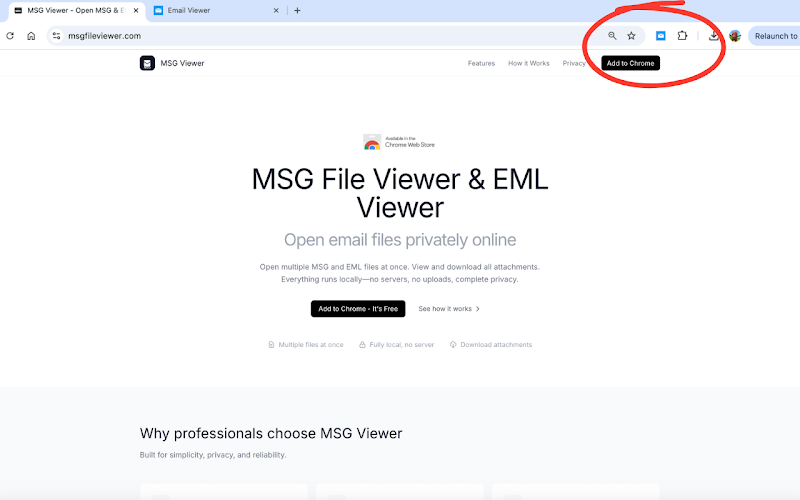
Add the Extension
Install MSG Viewer from the Chrome Web Store. One click, no registration, installs in seconds.
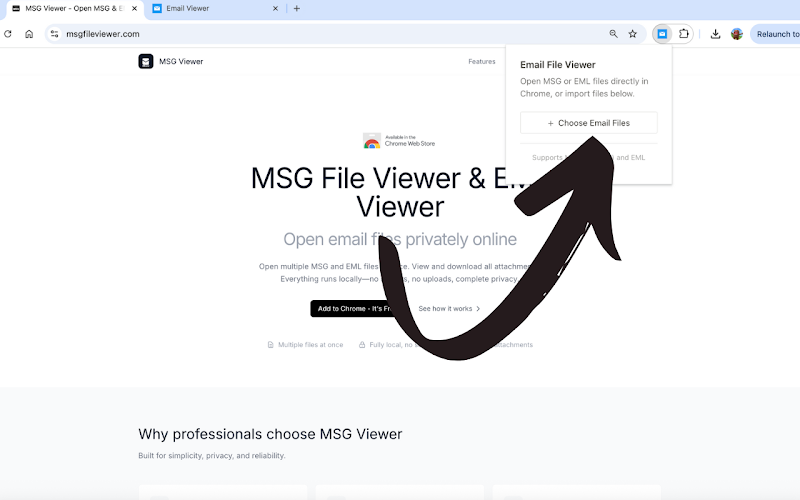
Import MSG Files
Click the extension icon, then "Import Files" to select your MSG files. Open one file or batch process dozens simultaneously.
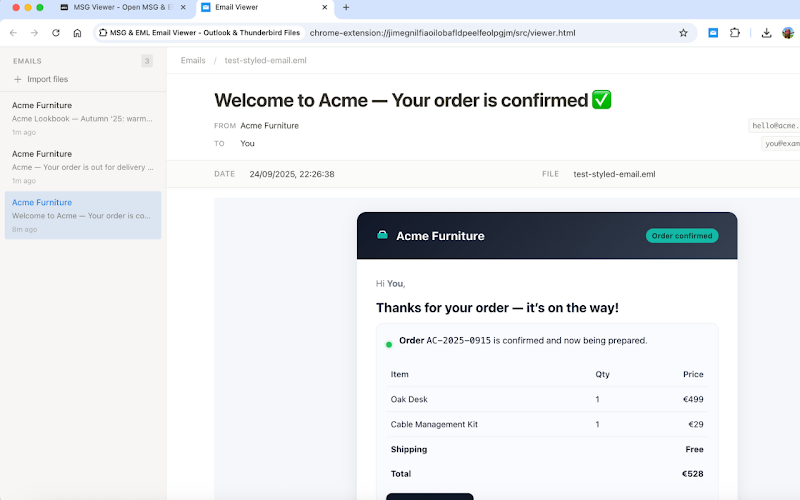
Read & Download
Your email opens with complete formatting. Read the message, inspect headers, view embedded images, and download all attachments.
Why Use an Online MSG Viewer?
Skip the expensive software. Open MSG files right in your browser.
No Outlook Needed
Don't have Microsoft Outlook? No problem. MSG Viewer reads the proprietary MSG format directly, giving you full access to email content without any Microsoft software.
Truly Private
Unlike web-based MSG viewers that upload your files to a server, MSG Viewer processes everything locally. Your sensitive emails never leave your machine.
Any Operating System
MSG files are a Windows/Outlook format, but our viewer works on Mac, Linux, and Chrome OS too. If you have Chrome, you can view MSG files.
Lightning Fast
MSG files open instantly. No waiting for uploads, no processing delays. Click import, see your email. Even large MSG files with multiple attachments render in seconds.
Batch Processing
Need to review dozens of MSG files? Import them all at once. Each email opens in its own view, making it easy to browse through large collections.
Free Forever
No subscriptions, no premium features, no limits. MSG Viewer is and will always be completely free. All features available to everyone.
Open MSG Files from Anywhere
View MSG files from your computer or directly from cloud services
Local Files
Import MSG files from your computer via the extension popup
Google Drive & Dropbox
Click on MSG files in cloud storage — they open automatically
Notion & More
View MSG attachments in Notion and other web apps without downloading
MSG Viewer Online FAQ
Common questions about viewing MSG files online
What is an MSG file and why can't I open it?
How is this different from other online MSG viewers?
Can I view MSG files on a Mac?
Can I download attachments from MSG files?
Does the MSG viewer also support EML files?
Does it work without an internet connection?
View MSG Files Online Now
Free forever. No Outlook needed. No files uploaded. Install in seconds.
Add to Chrome - It's FreeAlso opens EML files · Works on Windows, Mac, Linux, Chrome OS